Google Search Console for Kenyan Businesses: Setup and the Reports That Matter
Google Search Console is a free tool from Google that shows how your website performs in Google Search: which searches bring visitors, which pages are indexed, and what technical problems are holding you back.
Google Search Console is a free tool from Google that shows how your website performs in Google Search: which searches bring visitors, which pages are indexed, and what technical problems are holding you back. For a Kenyan business, it is the most reliable way to see what Google actually thinks of your site, and it costs nothing.
Yet many business websites in Kenya have never been connected to it, or were set up by a developer who still holds the access. This guide explains how to set it up properly, which reports matter, and the routine checks that catch problems before they cost you customers.
Search Console vs Google Analytics
The two are often confused.
- Search Console shows what happens in Google Search before someone clicks: the searches you appear for, your average position, impressions and clicks, plus indexing and technical health.
- Google Analytics shows what visitors do after they arrive: pages viewed, time spent, and conversions such as forms and WhatsApp clicks.
You need both. Search Console tells you if you are being found. Analytics tells you if being found turns into business.
Setting it up properly
- Use a business Google account that the company controls, not a developer’s personal account.
- Add a Domain property rather than only a URL-prefix property. A Domain property covers every version of your site, including www, non-www, http and https. It is verified by adding a DNS record at your domain registrar or host.
- Submit your XML sitemap. Most WordPress SEO plugins create one automatically, often at /sitemap_index.xml.
- Add your team and agency as users with the right permission level, and remove people who no longer need access.
- Link Search Console to Google Analytics so you can see search and behaviour data together.
If someone else set up Search Console for your site in the past, ask them to add you as an owner. Ownership should sit with the business, just like your domain and hosting.
The reports that matter most
Performance
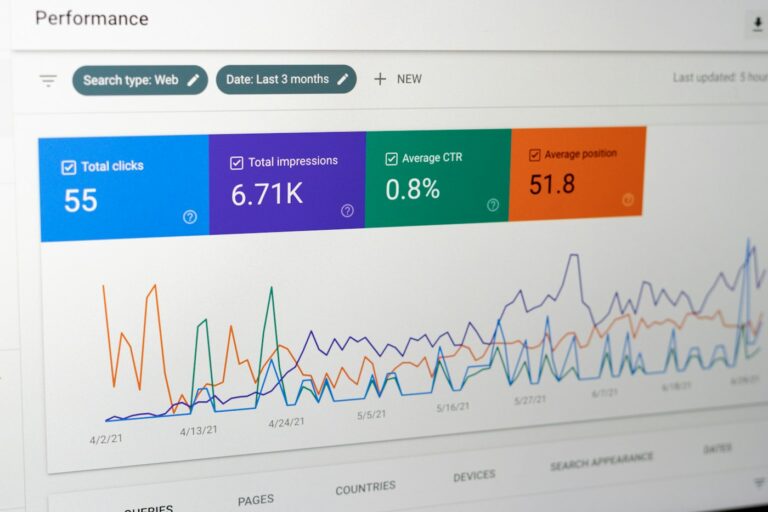
The Performance report shows the searches you appear for, with clicks, impressions, click-through rate and average position. Useful checks:
- Queries with many impressions but few clicks. You are being seen but not chosen. Improve the page title and meta description, or the page itself.
- Queries in positions 8 to 20. These are close to page one and often the quickest wins.
- Pages losing clicks over time, compared with the previous period.
- Country and device. Check that Kenyan mobile users are finding you, and, for tourism businesses, that your source markets are.
Google added a branded queries filter to the Performance report in November 2025. It separates searches that include your brand name from everything else, so you can see how much traffic comes from people who already know you versus people discovering you. Non-branded growth is the clearest sign your SEO is working.
Note that visits from Google’s AI features, such as AI Overviews and AI Mode, are counted within your normal web search data rather than shown separately.
Page indexing
This report shows which pages Google has indexed and why others are not. Statuses worth understanding:
- Crawled, currently not indexed: Google saw the page but chose not to include it. Often a sign of thin or duplicate content.
- Discovered, currently not indexed: Google knows the page exists but has not crawled it yet. Often a sign of weak internal linking or a large site.
- Excluded by noindex tag: check that this is deliberate. An accidental noindex can remove important pages from Google.
- Not found (404) and redirect errors: common after a redesign when old pages were not redirected.
URL Inspection
Paste any page address to see whether it is indexed, when Google last crawled it, and how Google sees it. After publishing or fixing an important page, you can request indexing from here.
Core Web Vitals
This report groups your pages by real-world loading and responsiveness data from Chrome users. For Kenyan sites, the mobile report matters most, because most visitors arrive on mobile data.
Security issues and manual actions
These two reports should normally be empty. If your site is hacked, or Google takes manual action for spam, you will see it here. Check them every month, and immediately if traffic suddenly falls.
Links
Shows which sites link to you and which of your pages receive the most internal links. Useful for spotting important pages that your own site barely links to.
A monthly 20-minute routine
- Compare the last 28 days with the previous period in Performance. Note any big drops or gains.
- Check the branded versus non-branded split.
- List five queries in positions 8 to 20 to work on.
- Open Page indexing and look for new errors or sudden changes.
- Check Security issues and Manual actions.
- Review Core Web Vitals on mobile.
- Add an annotation for any site change, such as a redesign, new pages or a campaign, so future you understands the graph.
When traffic suddenly drops
Before panicking, work through these in order:
- Check Security issues and Manual actions.
- Check Page indexing for a jump in excluded or error pages, which often follows a redesign, plugin change or accidental noindex.
- Compare queries. Did you lose one big keyword or many small ones?
- Check dates against known Google updates and your own site changes.
- Check seasonality. Tourism, education and retail searches in Kenya rise and fall with holidays and school terms.
Tanzania, Uganda and Rwanda
If you serve several countries, use the Country filter in Performance to see each market separately. For sites with language versions, such as Swahili and English, check that each version is indexed and ranking in the right country. Problems with hreflang settings often show up as the wrong language page appearing in search.
Setting up and reviewing Search Console is part of every SEO engagement we run. See our SEO services. If your site is not ranking at all, start with our guide to why websites fail to rank in Kenya. Planning a redesign? Use our website migration SEO checklist, and read about building a retrieval-first website that search systems can find and understand.